
Butcher Shop Online Ordering: A Practical Guide for Independent Butchers
The butchers we work with all describe the same Saturday: a queue out the door at 10am, a dead shop by 2pm, and the phone ringing through both. Online ordering doesn’t replace the counter — it moves the queue to the quiet hours. Orders come in Sunday night while the family plans the week; you prep Monday morning; they collect after work without waiting. This guide covers what to sell online, the five-step flow that works, the platform choice, and the two mistakes that sink most butcher web shops.
What’s in this guide
- The real case for online ordering (it’s not “being modern”)
- What actually sells online — and what doesn’t
- The five-step ordering flow
- Platform choice: your site vs marketplace apps
- Why product photos decide whether any of this works
- The two mistakes that sink butcher web shops
- Fitting orders into a real prep day
- The numbers to watch in month one
- Frequently asked questions
The real case for online ordering (it’s not “being modern”)
Three numbers drive it. Order timing: household meat decisions happen Sunday evening and weekday nights — hours your counter is shut. Basket size: people composing an order on a screen add more than people ordering across a busy counter, because nobody’s waiting behind them. Christmas: pre-orders with deposits turn your most chaotic fortnight into a planned production run instead of a phone-message lottery. None of that requires an app or a tech team — just a clean order page on the website you already have.
What actually sells online — and what doesn’t
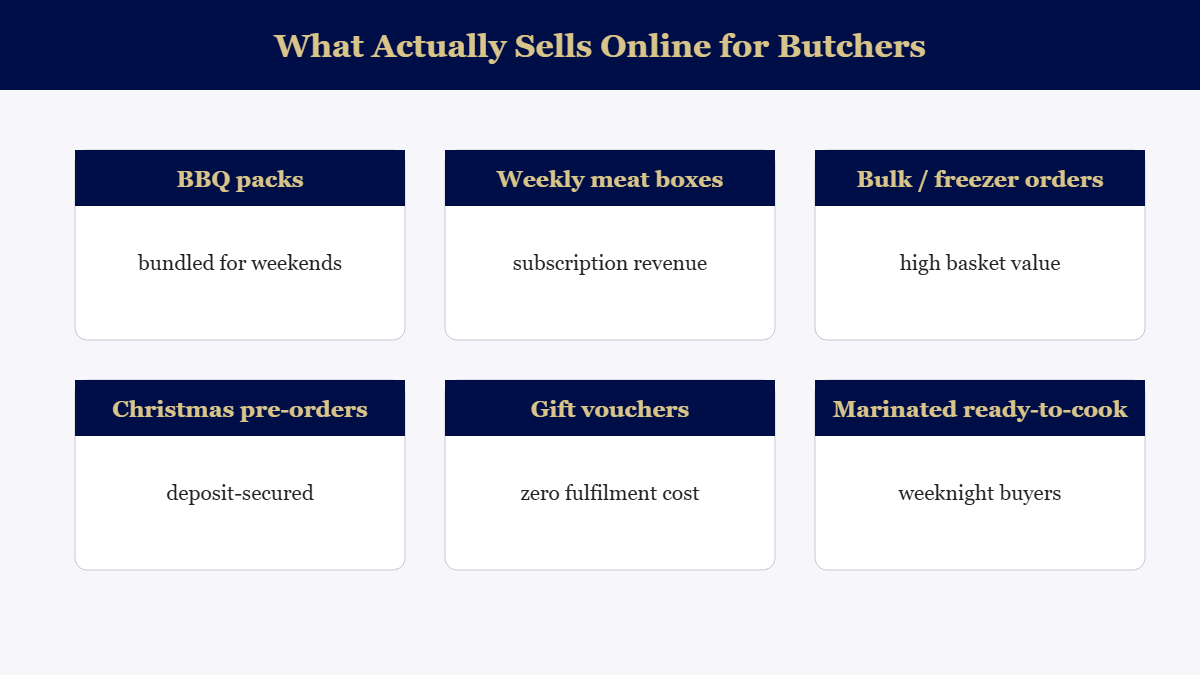
Notice what’s not on the list: the full counter range. Putting two hundred individual cuts online creates choice paralysis and a stock-sync headache. Start with six to ten composed products — a weekend BBQ pack, a family weekly box, a bulk freezer deal — where you control the contents and the margin. Single cuts can come later; bundles are where online butcher revenue actually lives.
The five-step ordering flow
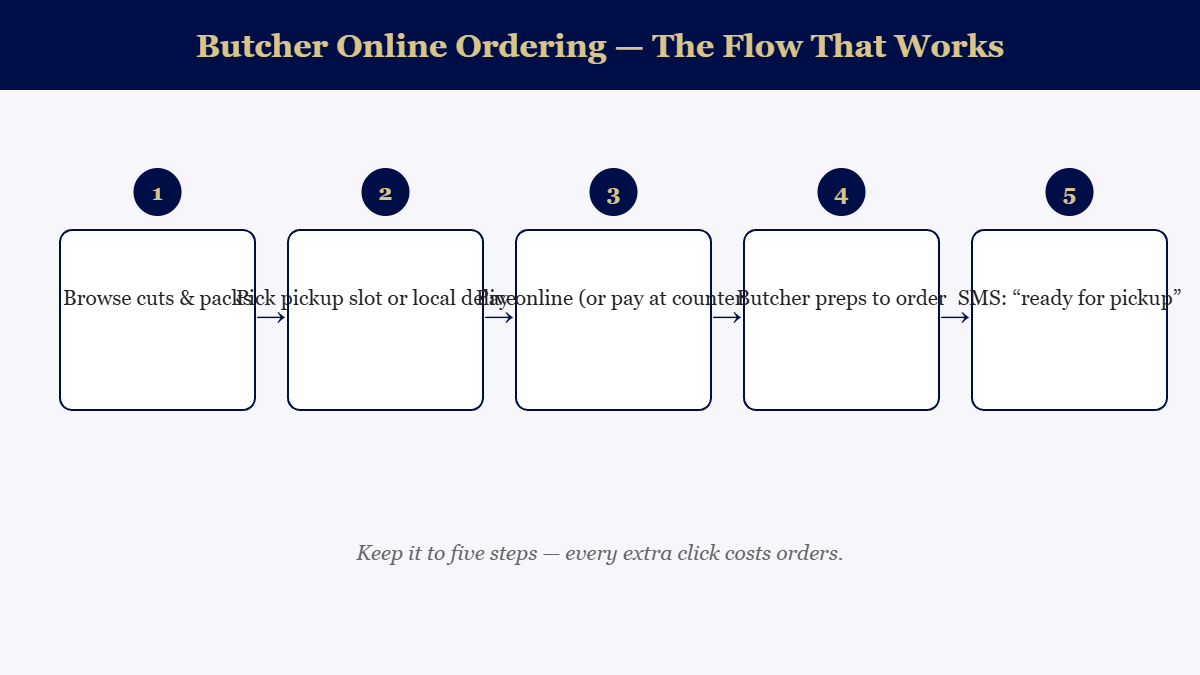
Two details in that flow do the heavy lifting. Pickup slots spread collection across the afternoon instead of recreating the Saturday queue — and they quietly tell you tomorrow’s prep list tonight. The “ready” SMS is the difference between a system that feels professional and one that feels like an experiment; it’s also your only chance to confirm final weights on variable cuts before anyone’s standing at the counter surprised.
Platform choice: your site vs marketplace apps
Marketplace and delivery apps get you live in a weekend — and take a commission on every basket, forever, while keeping the customer data. For an independent butcher whose whole advantage is relationship, that’s a bad trade. WooCommerce on your own WordPress site costs more attention up front and nothing per order after, supports pickup-slot booking, and keeps every customer email for your Christmas list. It’s the same reasoning we walk through on our web design page: own the asset, don’t rent the audience. If your current site can’t take an order page without falling over, that’s the first thing to fix — and it’s usually less work than owners fear.
Why product photos decide whether any of this works
Here’s the uncomfortable truth about selling meat online: the photo is the product. At the counter, the display case does the selling; on a screen, a dim phone photo of a BBQ pack reads as “frozen mystery” and kills the order. Fresh food photography is a specific craft — fast (the product sweats under lights), styled without being dishonest, and colour-true so the sirloin looks like sirloin. It’s exactly the kind of shoot we run for butcher clients: one session covers the whole online range plus a month of social content, and the order page conversion difference is visible in the first week. Phone photos are fine for stories; they are not fine for the buy button.
The two mistakes that sink butcher web shops
Mistake one: launching silently. An order page nobody knows about sells nothing. The launch needs a fortnight of counter cards, a sign at the register, a pinned post, and — the one that works best — staff mentioning it to every customer who rings to reserve something. The phone-reservers are your pre-qualified first users.
Mistake two: treating it as set-and-forget. The shops that win update the packs seasonally (footy finals box, Christmas ham pre-order, Australia Day BBQ bundle) so there’s always a reason to reorder. A static page decays; a seasonal one compounds — and each seasonal pack is a ready-made social post and a reason to email your list. That rhythm, not the technology, is what makes online ordering a revenue line instead of a widget.
Thinking about adding ordering to your shop’s site — or building a site that can take it? Book a free consultation or call 07 2142 4335. See how we work with butchers on our butcher marketing page.
Behind the counter: fitting online orders into a real prep day
The operational fear is legitimate: nobody wants a printer chattering orders into the Saturday rush. The fix is batching. Set order cut-offs — “order by 8pm for next-day pickup” — so online work becomes a known morning prep block, not a live interruption. Cap daily order numbers while you find your rhythm (scarcity even helps sales), and fold the picking list into the same bench run you already do for counter stock. Shops that batch this way report the strange opposite of the fear: online orders smooth the day, because a chunk of demand arrives pre-decided, pre-paid and pre-scheduled instead of walking in all at once at 11am.
The numbers to watch in month one
Skip the vanity dashboard and watch four things: orders per week (trend, not total), average basket vs counter average (online should run higher — if not, your bundles are too small), pickup-slot spread (clustering means you need more slots, a good problem), and repeat rate by week four — the single number that says whether this becomes a real revenue line. If repeats are coming without prompting, it’s working; pour the marketing on. If not, the usual culprit is photos or pack pricing, in that order.
← Explore all our Brisbane marketing guides
Want this handled for you? See our butcher shop photography & video in Brisbane — from $140.
Frequently asked questions
Do small butcher shops really need online ordering?
If customers ever ring ahead to reserve cuts, you already have online ordering — just running on your phone line. Moving it to a simple order page captures the same demand without interrupting counter service, and opens sales outside trading hours, which is when most households plan the weekly shop.
What’s the best platform for butcher online ordering?
For most independents, WooCommerce on your own website wins: no marketplace commission, your customer data stays yours, and pickup-slot plugins handle scheduling. Marketplace apps are faster to start but take a cut of every basket forever.
How do you handle weights that vary by cut?
Sell by approximate weight with a note (“priced per ~500g, final weight confirmed at pickup”) or price by pack. Customers accept small variances happily when the SMS confirms the final total before pickup.
Should delivery or pickup come first?
Pickup first, always. It needs no logistics, suits the after-work rush, and gets people into the shop where add-on sales happen. Add a tight local delivery radius later, once pickup volume proves demand.